Pipelines & configs generation#
A pipeline is described by a lstmcpipe config file: the list of stages to run and, for each stage,
the list of input and output paths.
Writing all these paths by hand is error prone, so lstmcpipe ships one PathConfig class per supported
pipeline (in lstmcpipe.config.paths_config) that knows where the MC data live on the cluster and builds
the whole directory tree for you.
The command line tool lstmcpipe_generate_config instantiates one of these classes and dumps the resulting
config file.
Generating a config: the tools#
Quickstart#
On the cluster (see Where to run it), in an environment with lstchain and lstmcpipe installed:
lstmcpipe_generate_config PathConfigAllSkyFull --prod_id 20240101_v0.10.5_my_prod --dec_list dec_2276
This writes two files in the current directory:
lstmcpipe_config_<today>_PathConfigAllSkyFull.yaml— the lstmcpipe configlstchain_config_<today>.json— a standard lstchain MC config
Both must be reviewed and edited (see After generation: what to check) before running:
lstmcpipe -c lstmcpipe_config_<today>_PathConfigAllSkyFull.yaml -conf_lst lstchain_config_<today>.json
Command line arguments#
Argument |
Description |
Default |
|---|---|---|
|
Positional and required. Name of the |
— |
|
Production ID. It is used to name the directories and files of the production, so make it unique and
explicit: date, lstchain version and a hint of what it is, e.g. |
|
|
Path of the generated lstmcpipe config file. |
|
|
Path of the generated lstchain config file. |
|
|
Overwrite the output files if they already exist. Without it, an existing file raises
|
off |
|
One or several declination lines, space separated, e.g. |
|
|
|
|
|
Any other argument of the config class constructor, as |
|
--dec_list, --source_prod_id and --kwargs are all simply forwarded to the constructor of the
requested class, so the arguments you may use depend on the class you asked for. Passing an argument a
class does not accept raises TypeError: __init__() got an unexpected keyword argument ....
# these two commands are strictly equivalent
lstmcpipe_generate_config PathConfigAllSkyFullDL1ab --prod_id NEW --dec_list dec_2276 --source_prod_id OLD
lstmcpipe_generate_config PathConfigAllSkyFullDL1ab --prod_id NEW --dec_list dec_2276 --kwargs source_prod_id=OLD
Known pitfalls with the arguments#
A single declination is not a declination list. Classes handling a single declination (
PathConfigAllSkyTraining,PathConfigAllSkyTesting, theirDL1abvariants…) takedec, notdec_list, and there is no--decoption: pass--kwargs dec=dec_2276.The values passed to –kwargs are always strings. They are parsed by splitting on
=and no type conversion is done, so boolean arguments cannot be turned off from the command line:--kwargs run_checker=Falsepasses the string"False", which is truthy, and the checker still runs. To disable a checker, use the Python API.The flavour of the generated lstchain config depends on the config class. For an AllSky production, the standard lstchain MC config is dumped as is (the same one you would get from
lstchain_dump_config --mc). For the prod3/prod5 pipelines, which have a fixed pointing, the pointing dependent RF features (alt_tel,sin_az_tel) are removed from it.–prod_id has a default. Forgetting it silently produces a production called
prod_00.
Where to run it#
All the AllSky classes discover the available pointing nodes by listing the directories of the
simulations on the cluster (under /fefs/aswg/data/mc/DL0/LSTProd2/). They therefore must be run on the
La Palma cluster, otherwise you get:
FileNotFoundError: The class must be run on the cluster to load available pointing nodes
Likewise, all the classes restarting from an existing production check that the source production exists
(run_checker), which also requires access to /fefs/aswg/data/.
Typically:
ssh cp02
source /fefs/aswg/software/conda/etc/profile.d/conda.sh
conda activate lstchain-v0.10.5
cd lstmcpipe/production_configs
mkdir 20240101_my_prod_id && cd 20240101_my_prod_id
lstmcpipe_generate_config PathConfigAllSkyFull --prod_id 20240101_my_prod_id --dec_list dec_2276
The available declination lines are the sub-directories of the training dataset, and can be listed with:
ls /fefs/aswg/data/mc/DL0/LSTProd2/TrainingDataset/GammaDiffuse/
At the time of writing: dec_931, dec_2276 (Crab), dec_3476, dec_4822, dec_5573,
dec_6166, dec_6166_high_density, dec_6676, dec_min_413, dec_min_1802, dec_min_2924.
To choose the one matching your source, see the pointings notebook in Find and display pointing nodes using lstmcpipe.
After generation: what to check#
The generated lstmcpipe config looks like:
workflow_kind: lstchain
prod_id: 20240101_v0.10.5_my_prod
source_environment:
  source_file: /fefs/aswg/software/conda/etc/profile.d/conda.sh
  conda_env: lstchain-v0.10.7          # <-- edit: the env used to run the production
slurm_config:
  user_account: dpps                   # <-- edit: `aswg` unless you are lstanalyzer
lstmcpipe_version: 0.11.0
prod_type: PathConfigAllSkyFull
stages_to_run:                         # <-- you may remove stages you do not want to run
  - r0_to_dl1
  - merge_dl1
  - train_pipe
  - dl1_to_dl2
  - dl2_to_irfs
stages:
  r0_to_dl1:
    - input: /fefs/aswg/data/mc/DL0/LSTProd2/TrainingDataset/GammaDiffuse/dec_2276/sim_telarray/node_.../output_v1.4
      output: /fefs/aswg/data/mc/DL1/AllSky/20240101_v0.10.5_my_prod/TrainingDataset/dec_2276/GammaDiffuse/node_...
  merge_dl1:
    - input: /fefs/aswg/data/mc/DL1/AllSky/.../GammaDiffuse
      output: /fefs/aswg/data/mc/DL1/AllSky/.../dl1_..._merged.h5
      options: --pattern */*.h5 --no-image        # <-- options passed to the lstchain script
      extra_slurm_options:                        # <-- slurm options for this job only
        partition: long
        time: '06:00:00'
Checklist:
source_environment.conda_env: the conda environment used to run the production (the generated value is only a default, it is not your current environment).slurm_config.user_account:dppsis the account oflstanalyzer; regular users should useaswg.stages_to_run: remove the stages you do not want to run. The entries left instagesare ignored (with a warning).r0_to_dl1anddl1abcannot both be instages_to_run.the paths themselves: number of pointing nodes, declinations, and the
prod_idappearing in the output paths.optionsandextra_slurm_optionsof the stages, if you need more memory/time or differentlstchainoptions (e.g.--gh-efficiencyfor the IRFs).the lstchain config, in particular the NSB tuning parameters (see
lstchain_tune_nsb).
The config can then be validated with:
lstmcpipe_validate_config lstmcpipe_config_<date>_<config_class>.yaml
Note that the config file is a plain YAML file: it can be edited, or even written entirely by hand, if none of the classes below matches your use case.
Python API#
Everything the command line does can be done in python, which is the way to go to pass non-string arguments
(such as run_checker=False) or to inspect/plot the production before dumping it:
from lstmcpipe.config.paths_config import PathConfigAllSkyFull

cfg = PathConfigAllSkyFull('20240101_v0.10.5_my_prod', ['dec_2276', 'dec_931'])
cfg.generate()                                    # builds the paths dict
cfg.save_yml('lstmcpipe_config.yaml', overwrite=True)

# useful checks before dumping
cfg.plot_pointings()                              # training and testing pointings
print(cfg.paths['r0_to_dl1'])                     # paths of a given stage
run_checker=False skips the verification that the source production exists, which is handy to prepare a
config for a production that is not finished yet, or to work off-cluster:
from lstmcpipe.config.paths_config import PathConfigAllSkyFullDL1ab

cfg = PathConfigAllSkyFullDL1ab('NEW_PROD', 'SOURCE_PROD', ['dec_2276'], run_checker=False)
Which config class should I use?#
Class |
Starts from |
Stages |
Required arguments |
|---|---|---|---|
R0 (simtel) |
|
|
|
DL1 of an existing prod |
|
|
|
merged DL1b of an existing prod |
|
|
|
R0 (simtel) |
|
|
|
R0 (training particles) |
|
|
|
R0 (training particles) |
|
|
|
R0 (test gammas) |
|
|
|
DL1 diffuse test set produced by |
|
|
|
training DL1 of an existing prod |
|
|
|
testing DL1 of an existing prod |
|
|
|
R0 (prod5 trans_80) |
|
|
|
DL1 of an existing prod5 prod |
|
|
In short:
you want a complete AllSky production from the simulations:
PathConfigAllSkyFull(orPathConfigAllSkyFullSplitDiffuseif you need full-enclosure IRFs);you want a tuned production (e.g. NSB matching a given field of view) from an existing one:
PathConfigAllSkyFullDL1ab;you only want to retrain models and re-apply them on existing DL1b:
PathConfigAllTrainTestDL1b;you want to run only a part of the pipeline, one declination at a time, or to assemble a non standard production: the building blocks listed in Building blocks: partial and per-declination configs.
Prod3 & Prod5 pipelines#
Here is the typical MC pipeline for the prod3 and prod5 productions
](https://mermaid.live/edit#pako:eNqdVV1rwjAU_SshD0NBh_row57cYOD2oI9tKZmNGkiTkqQbYv3vy4dN01YtW0C4vfec9Nx7LvYMdzzDcAmBPnvKf3ZHJBRYb2IGrkeWXweBiiPYzJqkOQeU5yjazFyQtIuF4IozU3VRp4wp3inhAHUcQDDLYtY82heA6fQFVGKWKp5mdF65rAmj1XreE-Fe2yO5tGf1xNViesS64KmB7BvD0oh2xxkRGk_0zeFwfXfm2lsT7OdDIb2J3VYyVVgqK9oEyZ-FpZ5_3-o27qHpbeiw_e1WBCLM9WKi5K5kjxvS7IH9ZegO1V9v18MybSOpLChRo1E3Mx53F_IuuQF2KxbuWx_AtT0DT113Grq_MZBTkALXXZg41N9kLSHX_xtUNmX3DJ51SWBEpxlSKBxdaL69oLcNdyxf1Nu7-N_2LlLPf7gJAW5oewPo8PZeB-NMdM10TDBGtcshYNEAKvtqnhKxr8D75i3SP5kMgCVmkijyTdSpAtvXz220bTIB2ZQssaBcRQU72EAmcAJzLHJEMv2ZOBt8DNUR5ziGSx1meI9KqmIYs4uGloU2Hr9mRHEBl3tEJZ5AVCq-PbEdXCpR4hq0Ikh7nNdJbDkf7nNkv0qXX-IaAyQ)
To generate a config for that pipeline, you may run:
lstmcpipe_generate_config PathConfigProd5Trans80 --prod_id whatagreatprod
PathConfigProd5Trans80 also accepts a zenith argument (default zenith_20deg), which selects the
zenith directory of the prod5 dataset:
lstmcpipe_generate_config PathConfigProd5Trans80 --prod_id whatagreatprod --kwargs zenith=zenith_40deg
Note that this pipeline is the only one running the dl2_to_sensitivity stage; the sensitivity plots
(.png next to the .fits.gz files) are produced automatically as part of that stage.
IMPORTANT NOTE: prod5 MC files need the config to set “focal_length_choice”: “EQUIVALENT” to be analyzed with lstchain >= v0.9
In the lstchain config, please set:
"source_config": {
    "EventSource": {
        "focal_length_choice": "EQUIVALENT"
    }
}
Prod5 DL1ab#
One can also start back from DL1, applying the dl1ab stage:
](https://mermaid.live/edit#pako:eNqVVMGKwjAQ_ZWQw6KgC_boYU-6sODuwR5tKbFNNZCmJU13Eeu_b5o0aVKt7BaE6Zs3M6_zYq4wLTMM1zCn5U96RlyA3T5iQD51czxxVJ3BZrdCGuqeEyoKdJCYjuIhU_FSlEyldOjkMMWp4H3WvPR5zLKI6VC1BMvlG2gzukLHViOJfLkbqWd4ZA1ZtqfCDPUKDGhLHGn3WzgO35MRLolEtjPrsvK7XuOl-Jg71VvB_cilwLVQyrog_rOAxNY9dsnnTNrl06Z98yVzRLTRKoofyrOcZ_osyXfSXZZtqXxVFUpwUleUiNlsjMzn7umZLNSkMaqo9hOfcHwfwMt467rUdnIkVKTCRnUXG70DosiF_NfSWqd0DF4lzDGiywwJZNbjGqkK75x9YGFgTl3wv1MXJLZu0lWH8-zUObTpU9d_uDZFi3YW2y3eT5lkMCRbNapMCM9b8LF_P8hfHT8h1pjVRJBvIi4tCLdf4SEckL6wg1VRRUtxqNhJBV1buIAF5gUimbxyrx07guKMCxzBtQwznKOGighG7CapTSWtxNuMiJLDdY5ojRcQNaIMLyyFa8EbbEgbgqR7hWVhVfSp73Z1xd9-AWAY62k)
The corresponding class is PathConfigProd5Trans80DL1ab. It replaces the r0_to_dl1,
train_test_split and merge_dl1 stages by a single dl1ab stage applied to the already merged
DL1 files of the source production:
lstmcpipe_generate_config PathConfigProd5Trans80DL1ab --prod_id anothergreatprod --source_prod_id whatagreatprod
The class checks at generation time that all the merged DL1 files of source_prod_id exist, and raises
FileNotFoundError on the first missing one. Use the Python API with run_checker=False to bypass
this check. The zenith argument is available here as well.
AllSky production pipeline#
R0 to IRFs#
Standard AllSky production pipeline for one training declination
](https://mermaid.live/edit#pako:eNqtVV1rgzAU_SshD6OFOloffdiT2xh0MNzemiJ3JrZCjCVGxmj735eoVTMjbN18Orkf5557c9UjTgrKcIBTXnwke5AKrSMiiEDtEy29F1moQpSbaIlaiIgO8JDQqQgG-H2Ak61F8gh5DmGWplXJDNPwfC3dGytVx4XM6adMPVe4XnUNanxth4bGatFw_aXHjrBusmP7ZZeTV4A87w6d5DJWRUz56jRqwLUBzqTW576d6TLGayv8rqDJzZncMbdEr_bRwXAu2okAzus5lFvnVTu5W9-Q9tKcTTituc1FNw7CuqaSkIn4kB3YbNbj-XxI2tvrlFxX5SW61VAy4DEFBZtIIxRqZMlpQ01WuPbtQTsXa3rGxjse8Gj7UBMyXMKxKWlNU-vdD8ihvM_wrRfC_y9JEyWa0VDum93NZHpCT9GDS5hl3ujTfwnDC6xxDhnV3-ejKUiw2rOcERxoSFkKFVcEE3HWodVBLwa7p5kqJA5S4CVbYKhU8fopEhwoWbFLUJjBTkLeRbE66bn5EdT_g_MXmSDsTg)
To produce a config to run such a pipeline, typically run on the cluster:
lstmcpipe_generate_config PathConfigAllSkyFull --prod_id whatagreatprod --dec_list dec_2276
This will generate a lstmcpipe config file and a lstchain config file.
- Please:
check thoroughly the lstmcpipe config
modify the lstchain config as you wish
Several declination lines can be trained in a single production. They are simply listed after --dec_list:
lstmcpipe_generate_config PathConfigAllSkyFull --prod_id whatagreatprod --dec_list dec_2276 dec_931 dec_min_413
In that case, one set of models is trained per declination, and the dl1_to_dl2 and dl2_to_irfs stages
are run once per declination on the (single, declination independent) test dataset. The r0_to_dl1 and
merge_dl1 stages of the test dataset are generated only once, for the first declination of the list.
DL1ab#
The DL1ab workflow is very similar, only starting from an existing DL1 dataset.
This workflow is typically used when a tuned production is needed for a given dataset. For example, a production specifically tuned to match the Crab FoV NSB level and analyse Crab data. In this case, you should produce your own lstchain config file using lstchain tools (see lstchain documentation).
](https://mermaid.live/edit#pako:eNqtVMtugzAQ_BXLhyqRQtVw5NATbVUplaq0t1BFCzaNJWMiY1RVIf9eY6A8bA5Jy2nZnR3PPuwTTnJCcYBTnn8lB5AKbbaRiATSX7hZe68yV7kodtpGrY0iHfaQ0IkIBnY8sJMPiyIecahSUHIp0xNkGYQsTcuCGrah4y9ksc12vcB3WqieD9W_V_PEU6KLZLmLRZ53jyrC1xBXdiesuVnwbp4OuQ1W3u1VvtcZ1aSYWtHMAJrMjMpPOslsEZ6JkUE_RpPSlQPnpvTCsXtO-jY4ZB6t54TTrbzNRjcOSnOqksDE_siOdLHo7eWyI-x9Bp7p03iBbrUpKXCPgIIO2sZqWLjx-8Za2ky351tah-1-zuwXaoDDNbNdSety7XDfDIfwBu2Pbo4_d3MuleKg77bZr1eUybRCz9vHqaCRa6f__ksQXmFtZ8CIfnJP9WERVgea0QgH2iQ0hZKrCEfirKHlUQ-fPhCmcomDFHhBVxhKlb99iwQHSpa0A4UMPiVkvyhqkl6at9088ecfuL_tWw)
The workflow then starts from a base production (the source_prod_id), produces new tuned DL1 (dl1ab steps) and trains a new set of models.
To prepare the lstmcpipe config, you want to:
find a base production to start with (see the list of productions in the documentation <productions> and look for the latest “base” or “unuted” one)
run on the cluster:
lstmcpipe_generate_config PathConfigAllSkyFullDL1ab --dec_list dec_2276 --prod_id anothergreatprod --kwargs source_prod_id=whatagreatprod
or, equivalently, using the dedicated option:
lstmcpipe_generate_config PathConfigAllSkyFullDL1ab --dec_list dec_2276 --prod_id anothergreatprod --source_prod_id whatagreatprod
At generation time, the pointing nodes of the source production are checked one by one: a node that exists in the simulations but not in the source production triggers a warning and is dropped from the new production. Read the warnings, they tell you what will not be reprocessed.
Retrain and apply a model#
](https://mermaid.live/edit#pako:eNqVUstqwzAQ_BUhSEkgNsRHHwoNLr2ktKS5WaFsrI0jsB7IMqWE_HvXUkwa6KXyQePVzKxG0pk3ViIv-bGzX80JfGCbrTDCMBr9cGg9uBNzUL9v36rsaZ8WxiGVxyYoa9hufau2oDXU1WZ1YBp9izJVWPCgjDLtLwPnbbDmjptKf5Gji-sT-2qJfSCSECZjhkKw1Q2ygnCe51cHNHLKlLQPU6sse2SaFF0_EWYzRk3iFuJqRJ9OOZzPb3ixmPhJXaeJrfcsJ5FH6DIJAe5Z1PcaJFpXmyJ7Gf93FIWiFf9LNn58yensNChJd3geewkeTqhR8JKgxCMMXRBcmAtRB0d7wmepgvW8PELX45LDEOzHt2l4GfyAE6lSQHevpyJGzWt6K_HJXH4Ay4i5SA)
The workflow starts from an existing PROD A with merged DL1b datasets, trains a new set of models and applies them to create a new set of DL2. Note: In case of source-dependent analysis, the missing parameters are computed on the fly by lstchain, allowing the use of this PathConfig to not recreate DL1 files.
Example of command to generate such a config:
lstmcpipe_generate_config PathConfigAllTrainTestDL1b --dec_list dec_2276 dec_931 --prod_id MY_NEW_PROD --kwargs source_prod_id=PROD-A
Only two stages are generated: train_pipe (from the merged DL1b of PROD-A) and dl1_to_dl2.
No DL1 file is created, which makes it by far the cheapest way to test a new set of training options
(RF parameters, features, source-dependent analysis…) on an existing production.
At generation time, the merged training DL1 files of the source production are checked for each declination. A declination whose files are missing is silently dropped (with a warning) from the production: check the generated config contains all the declinations you asked for.
Since this production retrains models, consider reusing the lstchain config of the source production, so that only the training options you meant to change actually differ.
Using GammaDiffuse to produce full-enclosure IRFs#
The configs PathConfigAllSkyTrainingWithSplit, PathConfigAllSkyTestingGammaDiffuse and PathConfigAllSkyFullSplitDiffuse introduce the possibility to divide the GammaDiffuse dataset into training and testing datasets:
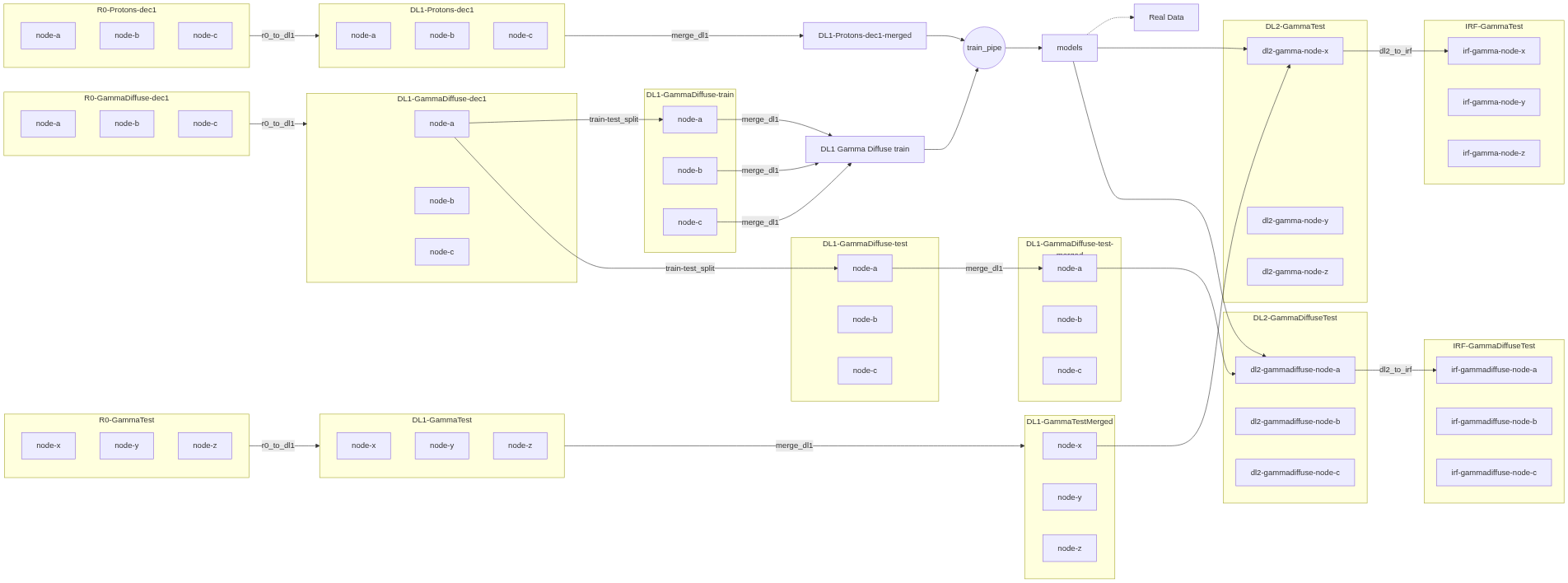
To use, you may run:
lstmcpipe_generate_config PathConfigAllSkyFullSplitDiffuse --dec_list dec_2276 --prod_id MY_NEW_PROD
PathConfigAllSkyFullSplitDiffuse runs the whole thing at once. The two sub-configs it relies on can also be
used separately (see Building blocks: partial and per-declination configs):
PathConfigAllSkyTrainingWithSplitproduces the DL1 and splits the GammaDiffuse dataset (50% train / 50% test, node by node). The test half is written underTestingDataset/while the train half stays underTrainingDataset/;PathConfigAllSkyTestingGammaDiffusepicks up that diffuse test half, merges it per node and runsdl1_to_dl2anddl2_to_irfson it. It must be run on a production generated withPathConfigAllSkyTrainingWithSplit, otherwise the input DL1 files do not exist.
Because the gammas are diffuse, the IRFs produced here are full-enclosure (no --point-like option), while
the point-source test gammas of the standard pipeline give point-like IRFs.
Building blocks: partial and per-declination configs#
The ...Full... classes above are assemblies of smaller classes, each handling a single declination and
a part of the pipeline. They are directly usable and are the right tool when you want to run only a piece of a
production, for instance to re-run the testing part of a production whose training is already done, or to add
a declination to an existing production.
They all take a dec argument (not dec_list), which must be passed through --kwargs:
Class |
Example command |
|---|---|
|
lstmcpipe_generate_config PathConfigAllSkyTraining \
    --prod_id MY_PROD --kwargs dec=dec_2276
|
|
lstmcpipe_generate_config PathConfigAllSkyTrainingWithSplit \
    --prod_id MY_PROD --kwargs dec=dec_2276
|
|
lstmcpipe_generate_config PathConfigAllSkyTesting \
    --prod_id MY_PROD --kwargs dec=dec_2276
|
|
lstmcpipe_generate_config PathConfigAllSkyTestingGammaDiffuse \
    --prod_id MY_PROD --kwargs dec=dec_2276
|
|
lstmcpipe_generate_config PathConfigAllSkyTrainingDL1ab \
    --prod_id NEW_PROD --source_prod_id OLD_PROD --kwargs dec=dec_2276
|
|
lstmcpipe_generate_config PathConfigAllSkyTestingDL1ab \
    --prod_id NEW_PROD --source_prod_id OLD_PROD --kwargs dec=dec_2276
|
What each of them does:
PathConfigAllSkyTrainingr0_to_dl1,merge_dl1andtrain_pipefor the training particles (GammaDiffuseandProtons) of one declination. Only the pointing nodes existing for both particles are kept (inner join on the pointings). It stops at the models: no DL2, no IRF.PathConfigAllSkyTrainingWithSplitsame as above plus a
train_test_splitstage that splits the GammaDiffuse nodes into a train and a test dataset. Use it when you want full-enclosure IRFs (see the previous section).PathConfigAllSkyTestingr0_to_dl1,merge_dl1,dl1_to_dl2anddl2_to_irfsfor the point-source test gammas. The DL1 of the test dataset are declination independent (and generated only once), but the DL2 and IRFs are produced with the models of the declination given bydec: the models of that declination must exist under the sameprod_id.PathConfigAllSkyTestingGammaDiffusethe same, for the diffuse gamma test dataset created by
PathConfigAllSkyTrainingWithSplit. It has nor0_to_dl1stage, since its DL1 come from the split.PathConfigAllSkyTrainingDL1ab/PathConfigAllSkyTestingDL1abthe
dl1abcounterparts of the two above: instead of starting from the simulations, they re-run the DL1 parameterisation on the DL1 ofsource_prod_id(typically with a tuned lstchain config). Pointing nodes missing in the source production are warned about and dropped.
Since each class generates a valid, self-contained config, a production can also be run in several steps: for
instance generate and run a PathConfigAllSkyTraining config for a new declination, then a
PathConfigAllSkyTesting config with the same prod_id to produce the DL2 and IRFs.